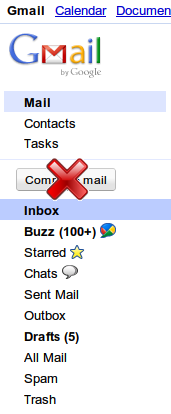
如何干掉新版 Gmail 里的“砖头块”

自从 Gmail 的新版 UI 出来以后,我就一直不爽。那个新的“Compose mail”的按钮又丑又碍事。就算是旧版 UI ,我也从来不点那个按钮的,(写邮件按快捷键 c 就可以了)现在一个我从来不点的按钮变成如此巨大,如此显眼,实在是令人不爽。像我这样有怨念的不止我一个,某猫也有怨念

好吧,今天闲来无事,就来把它干掉!

步骤

以下方法只适用于 Chrome/Chromium,至于 Firefox ……那多如牛毛的扩展里应该有解决方案吧……自救吧。

  1. 下载并安装 AdBlock+ Element Hiding Helper 这个扩展。这是 Chrome/Chromium 的各类 ABP 中我用得最惯的一个。其它扩展我没试过。
  2. 打开并登录 Gmail。
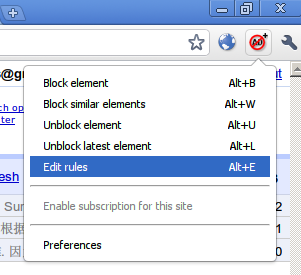
  3. 点击右上角的 AdBlock+ 的按钮,选择 Edit rules,或者直接按键盘上的 Alt+E 快捷键。如图:
  4. 复制粘贴如下代码:
    DIV[id=":o4"]:nth-child(1)>DIV[class="z0"]
  5. 确定。
  6. 按键盘上的 F5 刷新一下页面,可恶的砖头块已经没有了。

原理

本来这个扩展是可以方便地按 Alt+B 快捷键来删除页面元素的,但是对于 Gmail 这种有多个 iframe 的复杂页面,这种方法不奏效。反正我试着 Block 了半天也没 Block 成功。然后我就试着想自己写规则。根据 Inspect element 的结果,我写了如下规则:

HTML[class="cQ"]>BODY[class="cP"]>DIV:nth-child(3)>DIV[class="nH"]:nth-child(2)>DIV[class="nH"]>DIV[class="nH"]:nth-child(2)>DIV[class="no"]:nth-child(1)>DIV[class="nH nn"]:nth-child(1)>DIV[class="nH"]:nth-child(3)>DIV[class="nH pp"]:nth-child(1)>DIV[class="nH"]:nth-child(1)>DIV[id=":o5"]:nth-child(1)>DIV[class="nM"]:nth-child(1)>DIV[id=":o4"]:nth-child(1)>DIV[class="z0"]

结果失败了……

然后我注意到“砖头”所在的最后一级元素,也就是 DIV[class="z0"] ,的上一级元素是带 id 属性的,于是代码就可以简化为:

DIV[id=":o4"]:nth-child(1)>DIV[class="z0"]

然后确定,刷新页面。成功~

效果

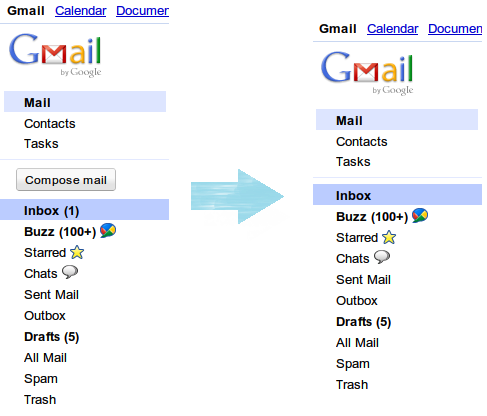
看图:
呃,有人问怎么把 Contacts manager 里的砖头块也去掉……那个去掉了就没法新建联系人了……

特别附注 & 再次说明:去掉砖头块之后是通过键盘快捷键 c 来写新邮件的……键盘快捷键功能请在设置项里开启……

~~~~
wzyboy
Twitter: @wzyboy

Leave a comment

11 Comments.

  1. 那。。怎么写新邮件?

    Google Chrome 6.0.495.0 Google Chrome 6.0.495.0 Windows 7 Windows 7
    Mozilla/5.0 (Windows; U; Windows NT 6.1; en-US) AppleWebKit/534.6 (KHTML, like Gecko) Chrome/6.0.495.0 Safari/534.6
    • @LvWind, 按键盘上的“c”键……

      Google Chrome 6.0.496.0 Google Chrome 6.0.496.0 Windows 7 Windows 7
      Mozilla/5.0 (Windows; U; Windows NT 6.1; en-US) AppleWebKit/534.6 (KHTML, like Gecko) Chrome/6.0.496.0 Safari/534.6
  2. 呃 我都是按按钮的 没有使用快捷键的习惯

    Firefox 3.6.8 Firefox 3.6.8 Ubuntu 10.04 Ubuntu 10.04
    Mozilla/5.0 (X11; U; Linux i686; zh-TW; rv:1.9.2.8) Gecko/20100723 Ubuntu/10.04 (lucid) Firefox/3.6.8
  3. 这图好给力

    Internet Explorer 6.0 Internet Explorer 6.0 Windows XP Windows XP
    Mozilla/4.0 (compatible; MSIE 6.0; Windows NT 5.1; SV1)
  4. 真实蛋疼,闲的慌。没想到还有人hack的。 :shock:

    Firefox 3.6.8 Firefox 3.6.8 Ubuntu 10.04 Ubuntu 10.04
    Mozilla/5.0 (X11; U; Linux i686; zh-CN; rv:1.9.2.8) Gecko/20100723 Ubuntu/10.04 (lucid) Firefox/3.6.8
  5. AdBlock+ Element Hiding Helper的中文规则订阅好像一直和QQmail冲突,造成QQmail不能正常显示
    有没有高人能写一个让QQmail不起作用的规则?谢谢了

    Google Chrome 6.0.495.0 Google Chrome 6.0.495.0 Windows 7 Windows 7
    Mozilla/5.0 (Windows; U; Windows NT 6.1; en-US) AppleWebKit/534.6 (KHTML, like Gecko) Chrome/6.0.495.0 Safari/534.6
    • @Sweet, 建议不要订阅里面的过滤规则。那个过滤规则似乎有些问题。我发现订阅了过滤规则之后像GoDaddy TDNS之类的网站都不能正常显示……

      还是不要订阅的好,在自己经常上的网站上自己建立规则吧~

      Google Chrome 6.0.496.0 Google Chrome 6.0.496.0 Windows 7 Windows 7
      Mozilla/5.0 (Windows; U; Windows NT 6.1; en-US) AppleWebKit/534.6 (KHTML, like Gecko) Chrome/6.0.496.0 Safari/534.6
  6. 用Thunderbird IMAP登录Gmail的表示情绪稳定.

    Google Chrome 6.0.472.36 Google Chrome 6.0.472.36 GNU/Linux GNU/Linux
    Mozilla/5.0 (X11; U; Linux i686; en-US) AppleWebKit/534.3 (KHTML, like Gecko) Chrome/6.0.472.36 Safari/534.3
  7. 不碍事的说、、 :shock:

    Namoroka 3.6.10 Namoroka 3.6.10 Windows XP Windows XP
    Mozilla/5.0 (Windows; U; Windows NT 5.1; en-US; rv:1.9.2.10) Gecko/20100919 Namoroka/3.6.10 (tete009 SSE2 PGO)
  8. 刚出来的时候,这块相当碍眼,现在慢慢习惯了= =

    Google Chrome 7.0.517.41 Google Chrome 7.0.517.41 Windows XP Windows XP
    Mozilla/5.0 (Windows; U; Windows NT 5.1; en-US) AppleWebKit/534.7 (KHTML, like Gecko) Chrome/7.0.517.41 Safari/534.7

Leave a Reply


[ Ctrl + Enter ]

Note: Commenter is allowed to use '@User+blank' to automatically notify your reply to other commenter. e.g, if ABC is one of commenter of this post, then write '@ABC '(exclude ') will automatically send your comment to ABC. Using '@all ' to notify all previous commenters. Be sure that the value of User should exactly match with commenter's name (case sensitive).